
CS111 Requirements
| Section Name | Description | Evidence of Implementation |
|---|---|---|
| Object Oriented Programming (OOP) | ||
| Writing Classes | Create minimum 2 custom character classes extending base classes | Writing Classes |
| Methods & Parameters | Implement methods with parameters (e.g., collisionHandler(other, direction)) |
Methods & Parameters |
| Instantiation & Objects | Instantiate game objects in GameLevel configuration | Instantiation & Objects |
| Inheritance (Basic) | Create class hierarchy with 2+ levels (e.g., GameObject → Character → Player) |
Inheritance (Basic) |
| Method Overriding | Override parent methods (update(), draw(), handleCollision()) |
Method Overriding |
| Constructor Chaining | Use super() to chain constructors |
Constructor Chaining |
| Control Structures | ||
| Iteration | Use loops for game object arrays, animation frames | Iteration |
| Conditionals | Implement collision detection, state transitions | Conditionals |
| Nested Conditions | Complex game logic (e.g., power-up + collision + direction) | Nested Conditions |
| Data Types | ||
| Numbers | Position, velocity, score tracking | Numbers |
| Strings | Character names, sprite paths, game states | Strings |
| Booleans | Flags (isJumping, isPaused, isVulnerable) | Booleans |
| Arrays | Game object collections, level data | Arrays |
| Objects (JSON) | Configuration objects, sprite data | Objects (JSON) |
| Operators | ||
| Mathematical | Physics calculations (gravity, velocity, collision) | Mathematical |
| String Operations | Path concatenation, text display | String Operations |
| Boolean Expressions | Compound conditions in game logic | Boolean Expressions |
| Input/Output (IO) | ||
| Keyboard Input | Arrow keys, space, WASD controls using event listeners | Keyboard Input |
| Canvas Rendering | Draw sprites, backgrounds, platforms using Canvas API | Canvas Rendering |
| GameEnv Configuration | Set canvas size, difficulty levels, game settings | GameEnv Configuration |
| API Integration | Implement Leaderboard API (POST/GET scores) | API Integration |
| Asynchronous I/O | Use async/await or promises for API calls | Asynchronous I/O |
| JSON Parsing | Parse API responses (leaderboard data, AI responses) | JSON Parsing |
| Documentation | ||
| Code Comments | JSDoc comments for classes and methods | Code Comments |
| Mini-Lesson Documentation | Create comic/visual post with embedded runtime game demo | Mini-Lesson Documentation |
| Code Highlights | Annotate key code snippets in documentation (OOP, APIs, collision) | Code Highlights |
| Debugging | ||
| Console Debugging | Use console.log() to track game state, variables, method calls |
Console Debugging |
| Hit Box Visualization | Draw/visualize collision boundaries to refine detection | Hit Box Visualization |
| Source-Level Debugging | Set breakpoints in DevTools, step through code execution | Source-Level Debugging |
| Network Debugging | Examine Network tab for API calls, CORS errors, response status | Network Debugging |
| Application Debugging | Examine cookies, localStorage, session data for login/state | Application Debugging |
| Element Inspection | Use Element Viewer to inspect canvas, DOM elements, styles | Element Inspection |
| Testing & Verification | ||
| Gameplay Testing | Test level completion, character interactions, collision detection | Gameplay Testing |
| Integration Testing | Test API integration (Leaderboard, NPC AI) with live backend | Integration Testing |
| API Error Handling | Try/catch blocks for API calls, network error handling | API Error Handling |
Each Programming Concept Demonstrated is shown below.
OOP Evidence
Writing Classes
Demonstrates creating custom classes like GameLevelFortress and UnifiedScythe to encapsulate game logic and behavior.
// GameLevelFortress.js - Main game level class
class GameLevelFortress {
    constructor(gameEnv) {
        this.gameEnv = gameEnv;
        this.scytheSpawnTimer = -300;
        this.scytheSpawnInterval = 120;
        // ... initialization code
    }
}

// UnifiedScythe.js - Enemy projectile class
class UnifiedScythe extends Enemy {
    constructor(gameEnv, type = 'regular', spawnX = null, spawnY = null) {
        const typeConfig = UnifiedScythe.getTypeConfig(type, path, width, spawnX, spawnY, gameEnv);
        super(scytheData, gameEnv);
        // ... scythe-specific initialization
    }
}
Methods & Parameters
Shows methods accepting parameters like findNearestScythe() and handleInterception(scythe) for targeted game logic.
// Interceptor.js - Methods with parameters for targeting
findNearestScythe() {
    const scythes = this.gameEnv.gameObjects.filter(obj =>
        obj.constructor.name === 'UnifiedScythe' && obj.scytheType === 'regular' && obj.canBeIntercepted()
    );
    // ... distance calculation logic
}

handleInterception(scythe) {
    this.hasIntercepted = true;
    this.revComplete = true;
    // ... interception logic with scythe parameter
}
Instantiation & Objects
Illustrates creating object instances dynamically in the game level configuration and during gameplay.
// GameLevelFortress.js - Creating object instances
constructor(gameEnv) {
    // Creating player instance
    this.classes = [
        { class: Player, data: sprite_data_mc },
        { class: Npc, data: sprite_data_helpful_npc },
        { class: Barrier, data: barrier_data }
    ];

    // Creating scythe instances dynamically
    const scythe = new UnifiedScythe(this.gameEnv, 'regular');
    this.gameEnv.gameObjects.push(scythe);
}
Inheritance (Basic)
Demonstrates class hierarchy with UnifiedScythe extends Enemy and Interceptor extends Character for code reuse.
// UnifiedScythe.js inherits from Enemy class
class UnifiedScythe extends Enemy {
    constructor(gameEnv, type = 'regular', spawnX = null, spawnY = null) {
        super(scytheData, gameEnv); // Calling parent constructor
        // ... child-specific initialization
    }
}

// Interceptor.js inherits from Character class
class Interceptor extends Character {
    constructor(gameEnv, spawnX, spawnY) {
        super({ id: 'interceptor' }, gameEnv);
        // ... interceptor-specific initialization
    }
}
Method Overriding
Shows overriding parent methods like update() to implement custom behavior in child classes.
// UnifiedScythe.js overrides parent update method
update() {
    if (this.revComplete) return;

    // Check lifespan for timed scythes
    if (this.lifespan && this.creationTime) {
        const currentTime = Date.now();
        if (currentTime - this.creationTime >= this.lifespan) {
            this.revComplete = true;
            this.destroy();
            return;
        }
    }

    // Custom motion update
    this.updateMotion();
    super.update(); // Call parent update
}
Constructor Chaining
Demonstrates using super() to chain constructors and initialize parent class properties.
// UnifiedScythe.js - Constructor chaining with super()
constructor(gameEnv, type = 'regular', spawnX = null, spawnY = null) {
    const scytheData = {
        id: `${type}_scythe_${Math.random().toString(36).substr(2, 9)}`,
        src: path + "/images/mansionGame/scythe.png",
        // ... configuration
    };

    super(scytheData, gameEnv); // Chain to parent constructor

    // Continue with child-specific initialization
    this.scytheType = type;
    this.setTypeFlags();
}
Control Structures
Iteration
Original evidence link: Iteration practice.
Conditionals
Original evidence link: Conditionals practice.
Nested Conditions
Original evidence link: Nested conditions practice.
Data Types
Numbers
Original evidence link: Numbers practice.
Strings
Original evidence link: Strings practice.
Booleans
Original evidence link: Booleans practice.
Arrays
Original evidence link: Arrays practice.
Objects (JSON)
Original evidence link: Objects JSON practice.
Operators
Mathematical
Original evidence link: Mathematical expressions practice.
String Operations
Original evidence link: String operations practice.
Boolean Expressions
Original evidence link: Boolean expressions practice.
IO Evidence
Keyboard Input
Shows event listener setup for keyboard controls like Space/I keys to fire interceptors.
// GameLevelFortress.js - Keyboard event handling
setupInterceptorControls() {
    this.boundFireInterceptor = this.fireInterceptor.bind(this);
    document.addEventListener('keydown', this.boundFireInterceptor);
}

fireInterceptor(event) {
    if ((event.code === 'Space' || event.keyCode === 32) ||
        (event.code === 'KeyI' || event.keyCode === 73)) {
        event.preventDefault();
        // Create interceptor at player position
        const interceptor = new Interceptor(this.gameEnv, spawnX, spawnY);
        this.gameEnv.gameObjects.push(interceptor);
    }
}
Canvas Rendering
Demonstrates Canvas API usage for drawing sprites with rotation, translation, and glow effects.
// UnifiedScythe.js - Canvas drawing with effects
draw() {
    this.canvas.width = this.width;
    this.canvas.height = this.height;

    this.ctx.save();
    this.ctx.translate(this.canvas.width / 2, this.canvas.height / 2);
    this.ctx.rotate(this.rotationAngle);

    // Add glow effects
    if (this.glowColor) {
        this.ctx.shadowColor = this.glowColor;
        this.ctx.shadowBlur = 40;
    }

    this.ctx.drawImage(this.spriteSheet, 0, 0, this.spriteSheet.naturalWidth,
                     this.spriteSheet.naturalHeight, -this.width / 2, -this.height / 2,
                     this.width, this.height);
    this.ctx.restore();
}
GameEnv Configuration
Shows configuring game environment settings like score configuration and stats initialization.
// GameLevelFortress.js - Environment setup
constructor(gameEnv) {
    let width = gameEnv.innerWidth;
    let height = gameEnv.innerHeight;
    let path = gameEnv.path;

    // Configure game environment
    this.gameEnv.scoreConfig = {
        counterVar: 'finalScore',
        counterLabel: 'Score',
        scoreVar: 'finalScore'
    };

    // Initialize scoring system
    this.gameEnv.stats = {
        scythesDestroyed: 0,
        survivalTime: 0,
        finalScore: 0,
        gameName: 'FortressGame'
    };
}
API Integration
Demonstrates extending the Coin class to integrate with the GameEngine’s leaderboard API system.
As explained in the Asynchronous I/O section, API integration was used in our SpriteSheetCoin.js file, which extends the basic Coin class that was used as a very basic example of the game. The GameEngine implements specific POST and GET methods.
Example of POST method from GameEngine Leaderboard.js:
// POST to backend using API chaining pattern
fetch(
    url,
    {
        ...fetchOptions,
        method: 'POST',
        body: JSON.stringify(requestBody)
    }
)
Asynchronous I/O
Shows using promises and fetch API for asynchronous leaderboard data retrieval and error handling.
Asynchronous Input/Output enables programs to continue running while waiting for input such as requests to a server or file system.
The GameEngine (v1.1) uses asynchronous I/O for API calls to the backend server to implement leaderboard. We used this in our SpriteSheetCoin.js file, which extends the basic Coin class that was used as a very basic example of the game.
Our SpriteSheetCoin.js:
import Coin from '@assets/js/GameEnginev1.1/Coin.js';

// ...

class SpriteSheetCoin extends Coin {
    // ...
}
GameEngine Leaderboard.js:
fetch(`${javaURI}/api/events/SCORE_COUNTER`, fetchOptions)
    .then(res => {
        if (!res.ok) throw new Error(`HTTP ${res.status}: ${res.statusText}`);
        return res.json();
    })
    .then(data => {
        this.displayLeaderboard(data);
    })
    .catch(err => {
        console.error('Error fetching dynamic leaderboard:', err);
        // Check for authentication errors (401 or 403 status)
        if (err.message && (err.message.includes('401') || err.message.includes('403'))) {
            list.innerHTML = `<p class="error">Please login to access this feature.</p>`;
        } else {
            list.innerHTML = `<p class="error">Failed to load leaderboard</p>`;
        }
    });
JSON Parsing
Demonstrates parsing JSON data from localStorage and API responses for leaderboard management.
Like asyncrounous I/O, JSON parsing occours in the GameEngine with the leaderboard, and was used by us in SpriteSheetCoin.js. This is the one example of json parsing from the leaderboard:
this.deletedElementaryIds = new Set(
    JSON.parse(localStorage.getItem(this.deletedElementaryIdsStorageKey) || '[]')
        .map((v) => String(v))
);
Documentation Evidence
Code Comments
Shows JSDoc-style comments documenting classes, methods, and properties for code clarity.
/**
 * Represents the Fortress game level with all game objects and systems
 * @class GameLevelFortress
 */
class GameLevelFortress {
    /**
     * Constructs the Fortress game level with all game objects and systems
     * @param {Object} gameEnv - The game environment containing width, height, path, and other properties
     */
    constructor(gameEnv) {
        /**
         * Timer for scythe spawning - increments each frame
         * @type {number}
         */
        this.scytheSpawnTimer = -300;  // Delay the first spawn

        /**
         * Interval for scythe spawning (120 frames = 2 seconds at 60 FPS)
         * @type {number}
         */
        this.scytheSpawnInterval = 120;
    }
}
Mini-Lesson Documentation
Provides links to external mini-lesson documentation for spline barriers and platformer game mechanics.
Spline Barrier Mini-Lesson Documentation
Platformer Mini-Lesson Documentation
Code Highlights
Annotates key code snippets with inline comments to explain critical game logic and implementation details.
// Handle NPC collisions <-- I annotate a key part of my code here!
if (this.scytheType === 'regular') {
    this.checkNPCCollision();
} else {
    // Special+ scythes ignore NPC collisions
    this._hittingNPC = false;
}
Debugging Evidence
Console Debugging
Demonstrates using console.log, console.warn, and console.error to track game state and debug issues.
// GameLevelFortress.js - Console logging for debugging
console.log('Scythe destroyed! New score:', this.gameEnv.stats.finalScore);
console.log('Level completed! Final scores:', this.scores);
console.warn('Could not find level with onScytheDestroyed method');
console.error('Error creating DialogueSystem:', error);

// Interceptor.js - Debug logging
console.log('SuperScythe spawned at top of screen with 4 key!');
console.warn('No player found for interceptor firing');
Hit Box Visualization
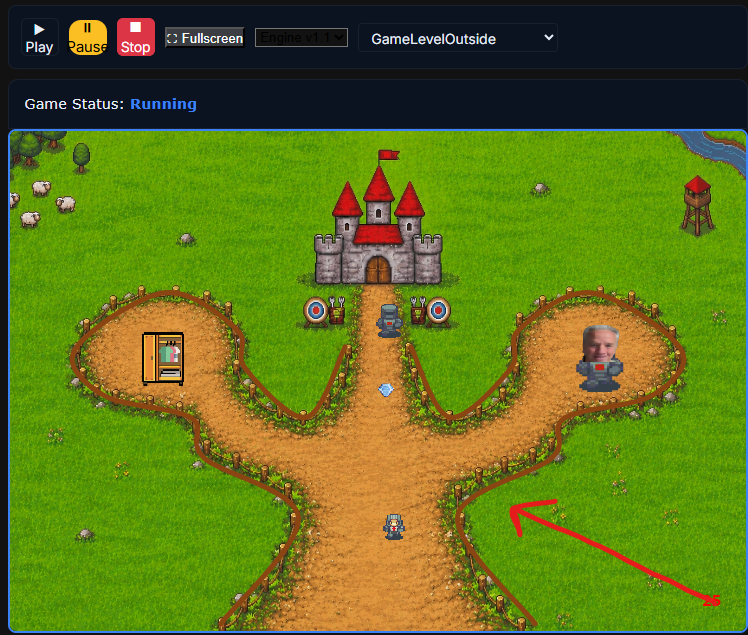
Shows visual debugging of collision boundaries to ensure accurate hitbox detection for spline barriers.
In this visualization, we’ve carefully crafted the hitboxes of spline barriers to ensure that they effectively block the correct areas. This visualization is crucial for debugging and ensures that our team maintains accurate and effective collision detection.
Source-Level Debugging
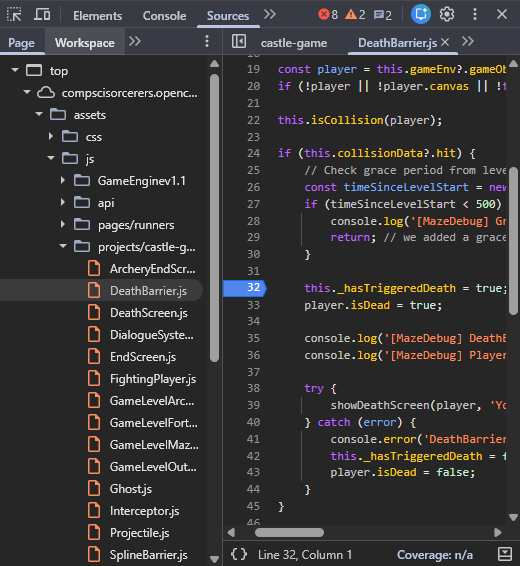
Demonstrates using Chrome DevTools breakpoints and JavaScript console for step-through debugging.
This is an image of my source level debugging, where I use the JavaScript console and add breakpoints into the source from the web page.
Network Debugging
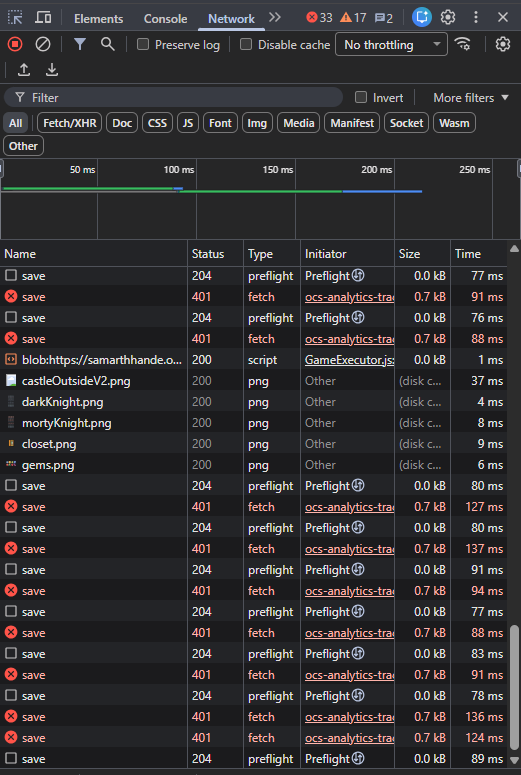
Shows examining network requests in Chrome DevTools to debug API calls and CORS issues.
This is an image of my network debugging, where I use Chrome developer tools to look through the network requests of my site.
Application Debugging
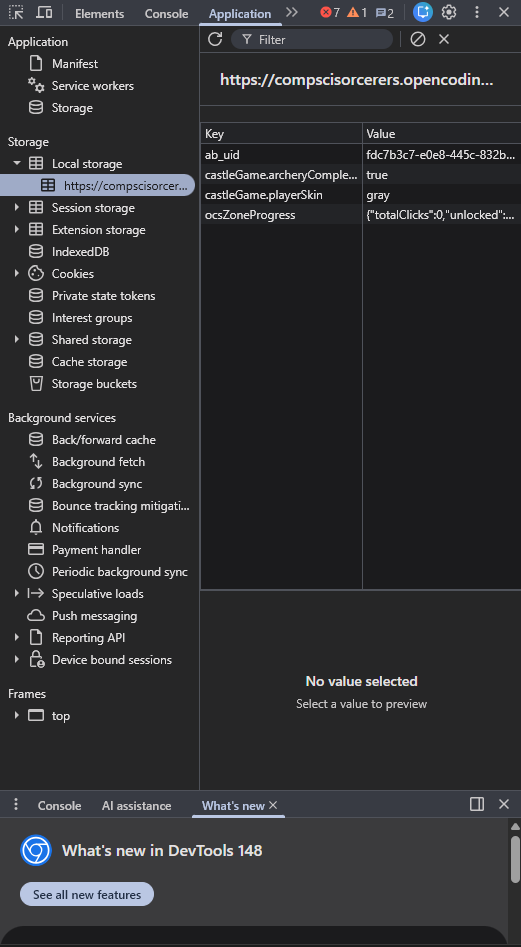
Demonstrates inspecting localStorage and application state in Chrome DevTools for debugging.
This is an image of my application debugging, where I use Chrome developer tools to look through the local storage of my site.
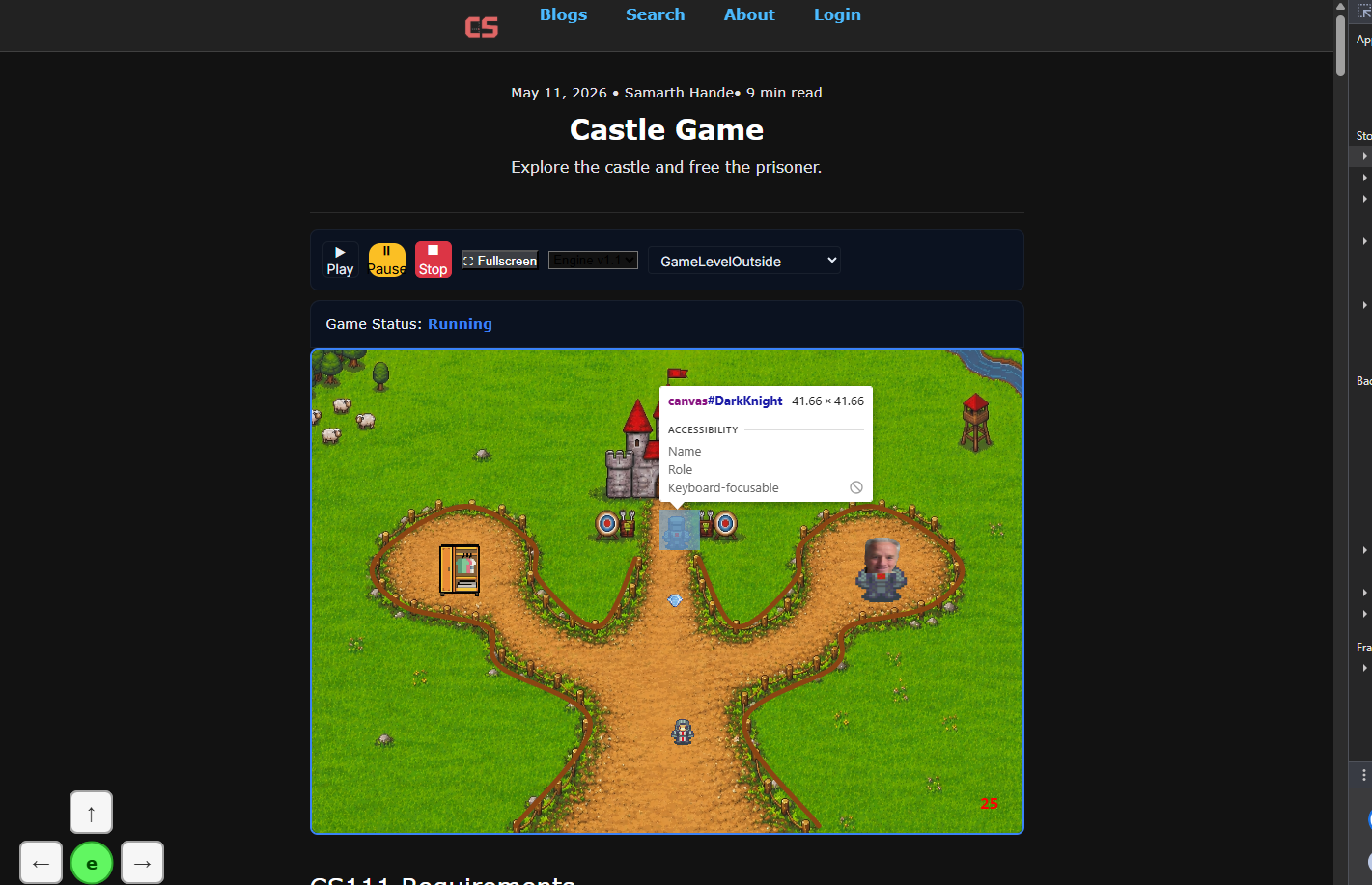
Element Inspection
Shows using Chrome DevTools element inspector to examine canvas elements and DOM structure.
Here, I use the inspect on the Chrome developer tools to inspect the Knight’s canvas element.
Testing Evidence
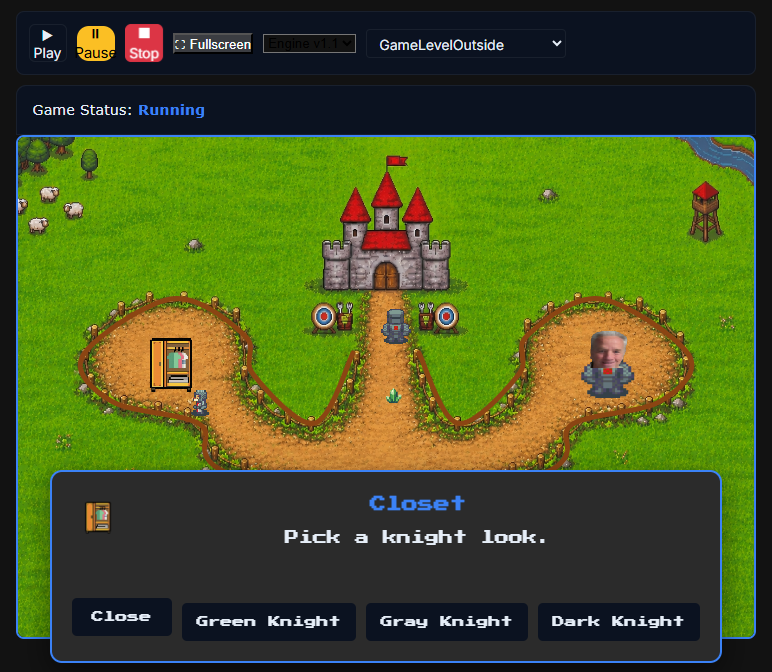
Gameplay Testing
Demonstrates testing player-NPC interactions and resolving distance-based interaction bugs.
Here in this image, I’m testing interactions between the player and the closet NPC. After there was a bug that caused this interaction to work from long distances. As you can see, I’ve resolved it!
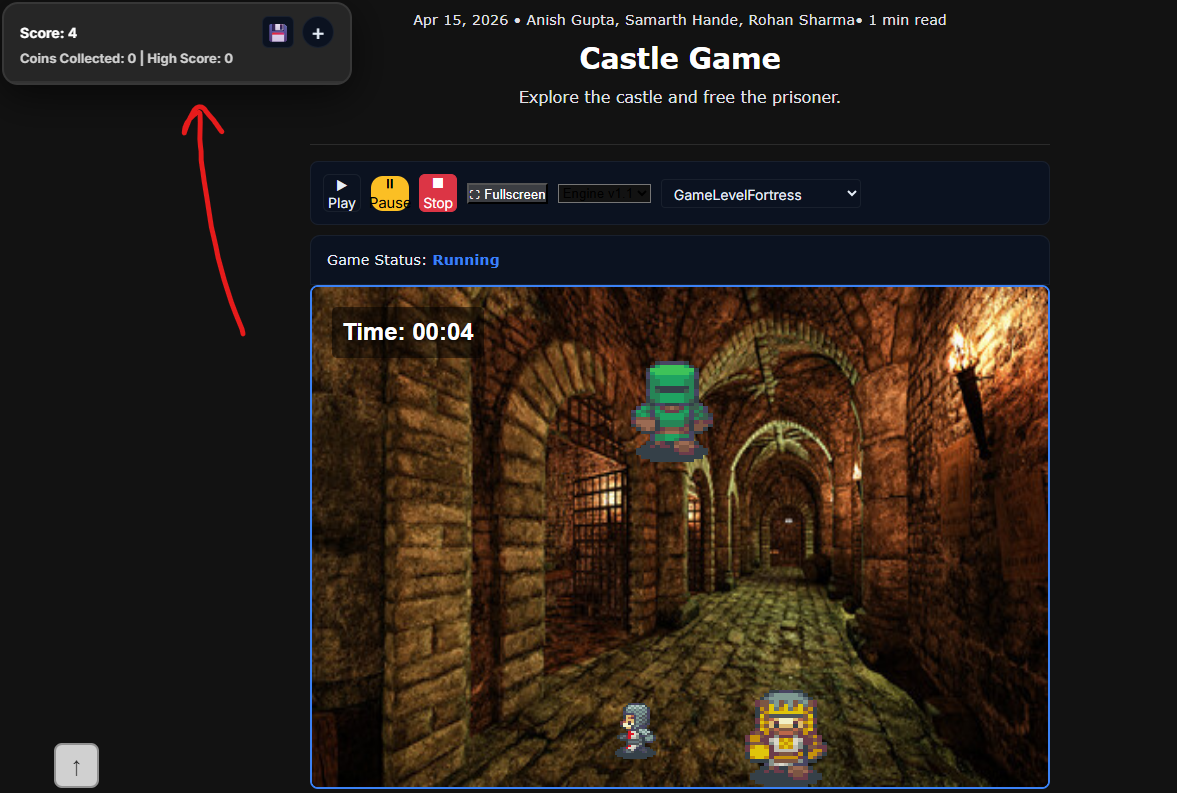
Integration Testing
Shows testing leaderboard integration to verify score updates and API functionality.
Here, I’m testing to make sure the leaderboard for game level fortress works. We can see the score updating!
API Error Handling
Demonstrates try/catch blocks and error handling for API calls in the GameEngine leaderboard system.
As stated in the Asynchronous I/O section, we used SpriteSheetCoin.js for the leaderboard. This contained code that used the game engine code shown below, which has the API error handling.
GameEngine Leaderboard.js:
fetch(`${javaURI}/api/events/SCORE_COUNTER`, fetchOptions)
    .then(res => {
        if (!res.ok) throw new Error(`HTTP ${res.status}: ${res.statusText}`);
        return res.json();
    })
    .then(data => {
        this.displayLeaderboard(data);
    })
    .catch(err => {
        console.error('Error fetching dynamic leaderboard:', err);
        // Check for authentication errors (401 or 403 status)
        if (err.message && (err.message.includes('401') || err.message.includes('403'))) {
            list.innerHTML = `<p class="error">Please login to access this feature.</p>`;
        } else {
            list.innerHTML = `<p class="error">Failed to load leaderboard</p>`;
        }
    });
Code Runner
Basic Data Types Runner
Code Runner Challenge
Strings & Other Basic Data Types
Basic Classes Runner
Code Runner Challenge
Classes & Methods Demonstrated